Showing posts with label SEO. Show all posts

Monday, September 29, 2014

6 YouTube Community Building Fundamentals


  1. Develop relationships with top contributors. Respond to frequent commenters, fans and followers. Ask questions about their interests etc.  The easiest way to find your top fans is to go to your Video Manager>Community>Fans.  Here you will find your most engaged and influential viewers.  Have you tried this?  Not only you will find your most important viewers here, if you go to Video Manager>Community>Insights, you can get vital data of your viewers like what they like to watch and general demographics.  YouTube is helping us understand our unique audience.  Use the tools and talk to them!
  2. Create content about your community.  Communities are about people. Talk about them as often as possible.  All of the top YouTubers talk directly to their fans and also create content specifically about them.  Whether it's a video about reading comments, giving away prizes or talking directly to them through their videos, your community will appreciate and embrace it.  Make videos involving your viewers!
  3. Recognize the contributions of individuals.  People love to be recognized.  It's a free way to encourage more contributions.  Talk about specific fans who gave you an idea about a video.  It kind of goes back to the above 2 but acknowledging the individual is important here.  
  4. Let heated debates happen.  Good debates are part of a healthy community.  Create content that spurs conversation.  Only remove hateful comments targeted at an individual or group.  
  5. Use the platform tools your community is familiar with.  Don't invest a minute of time into a social network that your community isn't using.   Find out what your viewers are on.  If they are on Instagram, that's where you should be.  Don't waste your time on Pintrest if your fans are not there. 

Have you already linked your G+ page to your YouTube page? If not you need to do that right now.  That way, you will be able to bring your top fans into Google Plus "Circles" so you can engage with them better.

Reference: YouTube Playbook

(TK)

Tuesday, August 5, 2014

How To Playlist on GTChannel


The 'how to' segment is the fastest growing category on YouTube. We've found that our how to video do pretty well too.  So we made a playlist of 'how to' videos from our network partners. 

This is mainly due to how we are using the internet now.  When was the last time you didn't know how to do something and you just 'Googled' it?  Most likely your 2nd or 3rd result on that search result page was a YouTube video.

Folks would just rather see and hear someone else showing them how to do things than reading about it.  It's faster and way easier that reading through a manual.

OEM Audio Plus is a car audio manufacturer that releases installation videos.  Just don't pay attention to the semi-annoying voice over,  this explanation totally makes sense.  


Peter@ Speed Academy explains and shows us how to install brakes and new coil-overs properly. He's not just a pretty face with manly legs.  


All of you GTChannel partners out there with How To videos, send your links to newvideo@gtchannel.com for inclusion in our playlist.

Wednesday, July 23, 2014

Top 10 YouTube Tips to Boost Your Channel

Evan Jones our YouTube Certified and Social Media ninja has given us top 10 YouTube Tips to boost your channel growth.  Many channels have followed these basic tips and grown substantially.  Make sure all of these things are done!

1. Video Titles: Use attention-grabbing, descriptive, and relevant keywords towards for the beginning of your titles and display branding and episode numbers towards the end. Keep titles concise so they fit on one line. Represent videos accurately without using misleading information. Thumbnails should reinforce the title but not necessarily duplicate.
 
See how we have used attention grabbing copy, "1000+ Horse Power Drift Machine..."?  Who doesn't like high power drift cars?   The series title "Controlled Chaos" and episode number follow to make sure these videos show up as relevant videos in the series.  

2. Thumbnails: Clear, in-focus, high-res images (640px by 360px minimum) that stand out at any size. Text should be legible at any size too. Thumbnails should never be misleading and instead, accurately represent content. Should be high-contrast, visually compelling imagery. Thumbnail support page on YouTube.  

3. Descriptions:  Explain your video in 1-3 concise sentences at the top of the description section. Use relevant keywords to help in discovery. Add experience-enhancing links like subscribe, similar videos, playlists, social media links, website, etc. below the video description. Titles and descriptions should be able to be understood by anyone, not just those who are subscribed to your channel or have previous knowledge of the content in the video. 

4. Annotations and End Slates: Annotations are clickable text overlays that can be used to boost engagement, give more information, and help with navigation within a video. End slates are title cards at the end of a video that ask the viewer to subscribe and promote more videos with the use of annotations. Annotation support page on YouTube. 

5. Playlists: These can be used to group a set of videos that you want viewers to enjoy in order. They can be grouped around a theme or event, can separate different shows, or can combine most-viewed pieces with new uploads. Great for helping viewers watch multiple videos on your channel. More on Playlists. 

6. Social Media: Facebook, Google+, Twitter, Instagram, etc. are awesome tools to build your brand, give your channel exposure, and interact with fans. Promote every video you release, and go about this in a variety of ways - use links, photos, direct uploads to social media platforms, or simply text. Be a consistent, authentic and authoritative leader. Share videos on social media.  

7. Consistent Themes and Characters: Having consistent themes and characters in your videos will bring viewers back to your channel time and time again. They will learn what to expect from your videos, driving watch time. You can even be that character yourself! 

8. Program Schedule: If possible, make a set release schedule for your uploads and communicate that schedule to your audience.

9. Image Quality: It's important to maintain a professional level of work when it comes to cinematography. Try to avoid camera movements that are overly shaky, make sure to include a wide variety of shots, shoot images that are crisp and clear, and upload to YouTube in HD if possible. 

10. Editing Quality: Editing can affect the mood, pacing, and storyline of your videos, amongst other things. Make sure your edits are tight, are not monotonous or predictable, and create a coherent piece. Text and graphics can also play a major part in your work by providing appropriate titles, pushing the story along, and giving your piece a certain feel. Audio levels should not peak and be somewhat equal throughout the video, with fades between audio cuts.

There is more you can do but we feel these 10 steps are minimal adjustments you can make on your own that will help you not only immediately but in the long run to get more video views and subscribers to help you grow your channel.

(TK)

Tuesday, June 17, 2014

GTChannel New Partners Welcome Post


GTChannel Welcome -  New Partners - 2014

New Partners -

Included are all the new partners joining the GTChannel community over the last month.  (I've also added a couple more partners that haven't accomplished all the starting line tasks to begin optimizing your channels.)

This email could be 100 pages long, but I'll attempt to keep it short and to the point.  I've had the pleasure of working with several of you to get you into the network.  I've enjoyed it.  You come from all areas and you all have your individual goals for the channel.  Some started their channels as a hobby, while others are ready to create the next BBC.  Some are individuals and some are large businesses already.  But in all regards you are all committed to growing your channels and the community as a whole.  We are thrilled to have you and look forward to watching you grow and succeed.

Let's get to it.

GTChannel is here to help.  If you have any problems - youtube, creating content, equipment, music, ideas, social marketing, whatever - if you have questions don't hesitate to ask.  

PARTNER INFO/PROFILE

Many of you have signed up off-line.  Our online signup and partner profiles is back online.  We want everyone to go online and set up a GTChannel Platform user/password.  There is also info for partner's details that we want to have in the system.
This will be redundant for some of you, but it will help us and you to have you on the platform.  If you already signed up this way - you are all set.


Click Start to run through the process.

You will also find info to do a couple important things.

1.  Add a logo, so we can use it for promotions
2.  Creating Channel Trailer - if you haven't started this it is very important to help get new subscribers.  Read up.
3.  Tax forms  (domestic US and international)

Important emails to keep

Scott@gtchannel.com - I'm always here to help.

Newvideo@gtchannel.com - when you upload, please shoot us the URL.  We will look at all partner uploads and look for the best ways to promote them.   Remember the goal is to build YOUR channel not our channel, so we look for the best avenue to promote the video.  YOU will be promoting this yourself as well, which is critically important.

Support@gtchannel.com -  We have set up a response system to make sure any request for help gets pushed to the right person.  While I'd love to help on social marketing, but I'm not the best guy for that - support@ will let us get that to the right person.  You should get a response in 24 hours or less.  If you don't - email me and I'll make sure you are taken car of.

When you join >> for new partners
We alway add new channel name on GTChannel.com
Promotion: Our social media team will promote in a variety of ways depending on what we think will help best.
1. Google+
2. Add to featured partner playlist on YouTube
3. Twitter
5. Instagram
6. Facebook
7. Press -  in these cases, we'll present some videos to press outlets that may pick up the video link.  It helps to have something special to get picked up. 
8.  Cross-promotion - part of our effort is to utilize the power of the network and community.  You may be asked to help another partner to cross-promote.  This will help you both, so we encourage you to participate in these opportunities.  One of the big secrets to success is to introduce your channel and content to an audience that hasn't found you yet.  Cross-promotion is a great way to do this.  You may be asked to include a partner's video on your channel, or to like a video, or other - in turn they will do the same for you.


Let's talk Social

There is likely no better way to grow your channel than using social.
If you don't have your social component set up - you need to get this going today!

*  Facebook page for Channel/Brand - this should be the same name as your YouTube channel with same logo.
* Instagram - same Channel/Brand as your YouTube channel
* Twitter - same Channel/Brand as your youtube channel
* Google + - VERY important, it ties into Youtube in a very powerful way.
*  If you are a video gamer - set up a TWITCH Page as well.

1.  Let GTChannel know all your social info.  We need to have this on file to help promote them as well.

2.  Subscribe to GTChannel's FB, Instagram, Twitter -  we communicate through social, and  it is important to be in the on going conversation

GTChannel Facebook - https://www.facebook.com/GTChannel
GTChannel Twitter - https://twitter.com/GTChannel   (@GTChannel)
GTChannel Instagram - http://instagram.com/gtchannel/
       (Here is a good video on how to set up google + from your YT channel > 

Subscribe to GTChannel Blog.  This is one of the key ways we communicate with partners.


3.  Take a look at your channel's about page -  This should include all your social links.  Here is GTChannel's about page.


4.  EVERY video that you upload should include your social (and web links)

Example ...


Much more on social to come ...

1.  how often to post
2.  how to buy more reach
3.  new technique to hit 10 time the reach as normal
  more ...


 UPLOADING Videos - 

1.  Make sure you have the category set for each video you upload - many will  be auto & vehicles.  Make sure you include this.  Going through new channel's videos I've seen many with this unlisted.  Remember, when youtube sells ads to brands, they do this by category in many cases, so it is important to be included in a category.

2.  Content ID 
     This is very important.  You should ONLY be clicking or checking this if your content is 100% your content.  If you don't own all of the material and assets you should not select this.  It will cause a variety of issues.  We'll have more follow up on this and the copyright, music discussion.

What's in a name.

Looking at many of the new partners (and some older ones) you have not set up your youtube channel URL yet.

You'll need to have your GOOGLE + account set up first very easy, and part of the task listed above, so let's add that again here.


Once you've set up Google +  let's fix the name.  Go to your channel >  select "About"  -  look at the URL


If your channel is listed as some UC + random set up numbers, we need to fix this so it shows your user name.
This is important since it is quite unwieldy to use the random UC code (This is technically called your Channel ID and will always be associated to your channel - you just don't want it visible).  Trust me no one is remembering this, better to have your channel URL look like this ...


Here is how to do it - watch the video.  


GTChannel Logos -

We have provided a GTChannel Network Partner logo for partners to use.   This can be used on videos, in your YT header, on social pages, and in your channel description.  This hi-res logo is attached here.  We will be putting out detailed info on how the logo should be used, and some ways we don't want it to be used.  We want this uniform to everyone so we are all building the brand in the same way.

For now, feel free to use on your vids - but keep it short.  Remember - the first 15 seconds is the MOST important to retain the audience.  If you have 20 seconds of logos and openings - you'll lose the viewer.  You can also use the logo in your channel ABOUT in the description.


MUSIC 

Always an on-going discussion.  My co-founder Taro, wrote up a great piece on this last week.  In case you missed it.


We often get questions on what kind of music to use and how to get good music for your videos.  
First thing we need to recognize is that the music you use in your video must be created by yourself or you have the rights to use someone else's music.  

You can create simple beats with some bass using software like Garageband but finding royalty free music is an easy way to incorporate music for your videos.  We all know, lousy music can make or break a video. 

Here are some of our suggestions on where to find royalty free music on the internet.  

  1. YouTube: Go to Video Manager>Creation Tools>Audio Library.  You will be surprised by the amount and quality of free music they offer here.  We strongly suggest you start here.https://www.youtube.com/audiolibrary
  2. Activity Music: There are several YouTube channels that offers free copyright free music in exchange for crediting the artist and placing a download link in the video description.  Activity Music is one of them.  They have tons of electronic music if that is what you're looking for.https://www.youtube.com/user/ActivityMusic
  3. Incomptech.com: From African music to Rock, these guys have something for everyone.http://incompetech.com/music/
  4. Dig.ccmixter.orgA site that has 1000s of songs with permission to use for your videos.http://dig.ccmixter.org/
  5. Josh Woodward: This guy knows what he's talking about.  He has hundreds of videos for you to use free of charge. Only thing he asks in return is to credit and include a link in your video description.  He even has a note on his website for YouTube partners.   http://www.joshwoodward.com/#/ 
Here are some sites we go to buy or license music. 
  1. Jamendo.com: We have often turned to Jamendo to find high quality licensed music.  You usually pay what you get for and when free stuff just isn't doing it, you have to go to the pros.http://www.jamendo.com/en/welcome
  2. YouLicense.com: Another site that offers decent music for a reasonable price.http://www.youlicense.com 
 I would recommend you go visit these sites to see which one matches your needs as a video creator.  Many of them lets you create an account and save playlists for future projects.  

RANDOM items 

In trying to put together some new partner suggestions MILLIONs of suggestions come to mind.  We can't include them all, but I thought I'd bullet point some suggestions, comments, and tips here.

*  Don't include dates in your video headlines.  They are great in 2014 ... but when 2016 comes along - no one will watch.
You want people watching these videos for the next 10 years.

*  Video constructions - Our goal is to increase TIME WATCHED.  This is the #1 factor youtube looks for and it is the one metric no one can game or manipulate.  The perfect use case is for a user to search or see your video listed on the platform.  They are interested, so they click it and watch all the way to the end.  That tells youtube that the viewer got what the viewer was looking for.  The video and your channel is rewarded for this through youtube recommendations, increased ad plays, and even higher CPMs (ad rates).  How do you do this?
-   Headlines that attract, but realistic to the video you will show.  If you say - BRAD PITT THROWS UP and you show a video
that has nothing to do with Brad Pitt - viewers will click out - BAD TIME WATCHED %.  Not what you want.

-  Good Tags - that help the viewer that is searching to find your video

- Thumbnails - engaging and interesting, and again NOT Brad puking.

-  First 15 - Remember the first 15 seconds is super important.  Just think of television - or film - they use this all the time.
You watch a James Bond movie and the movie opens with a crazy car chase or action scene ... then the movie open.  You are hooked.    If you watch a TV sitcom or drama - same thing - a tease scene up front.  Watch the news, they list the five stories that you might want to see - I always hate this because the one story I want to see is always last.
But this can be done on your vids as well - show a teaser or tell the audience what the video is about to get them excited - then open the video or move on to the good stuff.
Tell em' what your going to tell them > tell them > then tell em' what you told them.


*  Think Shareable
With the rise of social media platforms, sharing has become one of the most important ways to find and develop an audience. While you can't guarantee any video will go viral, you can make it more shareable by using some proven tactics.
Identify trending subject matter
Keep your finger on YouTube's pulse, and stay on top of popular search terms. 
What words will viewers use to describe your video when they share it? Would you click on this yourself? 

Connect through emotion
Viewers are more likely to share a video that elicits a strong emotional response. Make videos that induce laughter or feelings of sweetness, excitement or nostalgia.

Appeal to your audience's values
People often share content because they feel the content conveys something about their own beliefs. Sharing funny content makes them feel funny, sharing informative content makes them feel knowledgeable, and sharing topical content makes them feel on top of the latest news. Keep this in mind: What will your video say about the people who share it?
Create ongoing series with break-out potential
Viral videos and recurring series are NOT mutually exclusive.
Many of YouTube's top creators release series in which each episode enjoys high sharing and viral activity. Often one video will break out and then introduce massive audiences to the entire series. 

>>>>>>  The next steps ...

I've thrown quite a lot on you to start, but getting the channel up to speed with best practices is key to start building.

Please let me know any questions or thoughts you may have.  Work on the above and we'll see everybody grow.


Sincerely,

Scott Schlichter
CEO/Founder
GTChannel

Tuesday, April 22, 2014

VIDEO SEO TIPS YOU NEED TO DO NOW #2

#2 THUMBNAILS

In our previous newsletter we talked about how title, descriptions and proper tags/keywords help with SEO because of the algorithm that YouTube uses.  
Thumbnails on the other hand are more of a black art where you must guide(manipulate) the viewer to click on your video out of all of the other choices out there.  
   
Your titles, descriptions and tags will help your video display but if your thumbnails suck, no one will click on your videos and you will have lost all of that effort you put into SEO in the first place.  
As you may have noticed, thumbnails show up in different sizes and formats all across the YouTube platform.  For example, the same thumbnail can be cropped on a cell phone but come up intact on your PC.  So it is very important to make sure you have a vibrant and strong image that pops up no matter what size it is.  
These are some of the general guidelines of creating thumbnails.  
  •  When shooting your video, take still shots that will make great thumbnails. 
  • ALWAYS upload a custom thumbnail.  The YouTube auto generated thumbnail usually is not your best choice.  
  •  Make sure your thumbnail is not racy.  You will get negative points or flagged.  
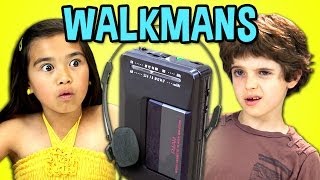
  • Consider legibility.  Look at the thumbnail above.  It's big, clear and even if the sides are cropped, the word "WALKMANS" will still remain.  
 

Look at the thumbnail above.  It's awesome.  This is a thumbnail from VSauce.  They have great thumbnails.  Although there is no text, he used an optical illusion to catch your attention.  Wouldn't you want to click on this video? 

Basic Vi 
sual
 Guidelines

  • Use visual cues (colors, images, shapes and personalities) that are consistent with your channel.  
 

  • A Clear and compelling image, in-focus, high resolution (640px x 360px minimum., 16:9 aspect ratio)
   

  • Close ups of faces always do well because of the impact factor.  
  

  • Foreground stands out from the background. 
 

Lastly the most important thing is that the
thumbnail accurately represents your content.  Don't just upload any image you think people will click.  Go shoot something people will want to click then you can include it in your video!  

Now go do it!  

Tuesday, April 1, 2014

VIDEO SEO YOU NEED TO DO NOW #1

Unless you are Ken Block and have a couple million dollars to burn on your next video, it's unlikely you can go without video search engine optimization(SEO).  
  
The first thing important to understand is that everything you see on YouTube (and Google) is based on their algorithm.  From which videos turn up as search results to how they prioritize their "suggested videos".  YouTube is the second largest search engine after Google (it's parent company) and you just can't afford not to optimize your videos.  
#1 PROPER TITLE & DESCRIPTIONS

Believe it or not, many people are too lazy to even title their videos.  This is super important for SEO.  ALWAYS title the video accurately based on the video content.  

How would someone search for your video?  Ask that question before you title the video. 

For example, if you have a cool burnout video, which title do you think is better optimized?

1. My best friend Joey's burnout
2. Nissan 370Z Awesome Burnout

Probably No.2 right?  

Because most likely someone will search with keywords such as "burnout" and "Nissan 370Z" than "my best friend Joey".  You're odds are better that way.  

As for the descriptions, make them as detailed as possible because again the algorithm will read through the description.  Include live links to sub, other videos or playlists, your blog or website and don't forget the social media links.  

Check out the description on one of our videos and feel free to use it as a template for your own videos. 

Nissan GT-R Track Pack Tsukuba Time Attack - Hot Version 115

Lastly let's talk about keywords too. 

Keywords do not appear on YouTube but they are very important for SEO.

When you upload a video, there is a box to fill out keywords RELEVANT to your video.

It's very important to fill out keywords because without them the YouTube software is missing vital information about your video and when it should be displayed.  Do not fill in keywords that have nothing to do with your video just to get placement.  Gaming the system always result in losing.  We have seen some cases where videos with irrelevant videos have been taken down.  

Most people don't know what they are searching for.  

That's why keywords are important.  Keywords help the software link search queries to certain videos.  A YouTube user doesn't know you have a Nissan 370Z nor your best friend Joey.  But with proper keywords, your video can appear when someone is searching for a 370Z or a burnout video on YouTube.  

For the above Nissan GT-R video by GTChannel, the appropriate keywords would be "nissan gt-r", "track pack", "tsukuba circuit", "time attack", "hot version", "keiichi tsuchiya" and such.  Note that these are all relevant keywords that would help users find this video.  

Go search "gt-r track pack" on YouTube.  This video came up 2nd when we searched.

You want to be on the first page when someone searches for that keyword!

It's never too late to SEO. Go into your YouTube Video Manager and start optimizing your past videos.  Experiment with different titles, descriptions and keywords.  

Go do it now!

Tuesday, March 18, 2014

Top 10 YouTube Video SEO Myths

We always receive a lot of questions about video optimization and here's a great video that covers some great points.  
Tim Schmoyer is a rockstar in the business and you should hear what he has to say. 

Top 10 YouTube SEO Myths