
We often get questions on what kind of music to use and how to get good music for your videos.
First thing we need to recognize is that the music you use in your video must be created by yourself or you have the rights to use someone else's music.
You can create simple beats with some bass using software like Garageband but finding royalty free music is an easy way to incorporate music for your videos. We all know, lousy music can make or break a video.
Here are some of our suggestions on where to find royalty free music on the internet.
Here are some sites we go to buy or license music.
I would recommend you go visit these sites to see which one matches your needs as a video creator. Many of them lets you create an account and save playlists for future projects.
Now go do it!
|

A Community of Automotive Content Creators.
Showing posts with label Newsletter. Show all posts
Showing posts with label Newsletter. Show all posts
Tuesday, May 6, 2014
Royalty Free Music Libraries

Use Facebook To Drive Traffic To YouTube
Facebook is a tricky one. But no matter what people may say about it, it's not going anywhere. So we better get used to it and get on it if you're not.
We admit, they do shady stuff like hiding your reach to only a certain percentage of your fans but they make the rules. Here are a couple things you need to do to use Facebook to your advantage.
1. Create a PAGE: Use your personal account for friends and family. Create a Facebook Page that is linked to your YouTube channel. Your YouTube channel is a brand and it needs a Facebook Page that can accept unlimited numbers of fans. A personal account is limited to 5000 friends.
2. Create a community on Facebook: YouTube is great for videos but Facebook is great for posting pictures and most of all sharing. Share your own videos and videos you like. You may notice that on the GTChannel Facebook Page,we share a lot of our partner videos but other random videos, photos and stories we like as well. Make it a destination spot for your fans!
3. Upload videos and images to your Facebook Page: We have found out that you get more REACH when uploading videos and images directly to Facebookand NOT posting links. It's just a way for Facebook to keep people on Facebook. How to get around this is to upload 15 second teasers of YouTube videos on to Facebook with a "Click here for full version" link in the description. See how we did it on this Travis Pastrana rally video!
Tuesday, April 22, 2014
VIDEO SEO TIPS YOU NEED TO DO NOW #2
#2 THUMBNAILS
In our previous newsletter we talked about how title, descriptions and proper tags/keywords help with SEO because of the algorithm that YouTube uses.
Thumbnails on the other hand are more of a black art where you must guide(manipulate) the viewer to click on your video out of all of the other choices out there.
Your titles, descriptions and tags will help your video display but if your thumbnails suck, no one will click on your videos and you will have lost all of that effort you put into SEO in the first place.
As you may have noticed, thumbnails show up in different sizes and formats all across the YouTube platform. For example, the same thumbnail can be cropped on a cell phone but come up intact on your PC. So it is very important to make sure you have a vibrant and strong image that pops up no matter what size it is.
These are some of the general guidelines of creating thumbnails.
- When shooting your video, take still shots that will make great thumbnails.
- ALWAYS upload a custom thumbnail. The YouTube auto generated thumbnail usually is not your best choice.
- Make sure your thumbnail is not racy. You will get negative points or flagged.
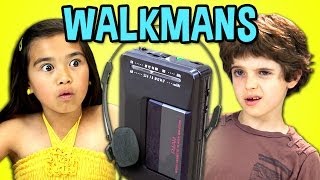
- Consider legibility. Look at the thumbnail above. It's big, clear and even if the sides are cropped, the word "WALKMANS" will still remain.

Look at the thumbnail above. It's awesome. This is a thumbnail from VSauce. They have great thumbnails. Although there is no text, he used an optical illusion to catch your attention. Wouldn't you want to click on this video?
Basic Vi
sual
Guidelines- Use visual cues (colors, images, shapes and personalities) that are consistent with your channel.
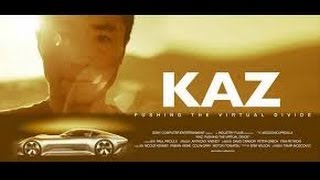
- A Clear and compelling image, in-focus, high resolution (640px x 360px minimum., 16:9 aspect ratio)
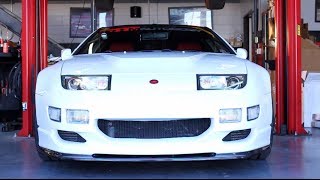

- Foreground stands out from the background.

Lastly the most important thing is that the
thumbnail accurately represents your content. Don't just upload any image you think people will click. Go shoot something people will want to click then you can include it in your video!
Now go do it!
Tuesday, April 1, 2014
VIDEO SEO YOU NEED TO DO NOW #1
Unless you are Ken Block and have a couple million dollars to burn on your next video, it's unlikely you can go without video search engine optimization(SEO).
The first thing important to understand is that everything you see on YouTube (and Google) is based on their algorithm. From which videos turn up as search results to how they prioritize their "suggested videos". YouTube is the second largest search engine after Google (it's parent company) and you just can't afford not to optimize your videos.
#1 PROPER TITLE & DESCRIPTIONS
Believe it or not, many people are too lazy to even title their videos. This is super important for SEO. ALWAYS title the video accurately based on the video content.
How would someone search for your video? Ask that question before you title the video.
For example, if you have a cool burnout video, which title do you think is better optimized?
1. My best friend Joey's burnout
2. Nissan 370Z Awesome Burnout
Probably No.2 right?
Because most likely someone will search with keywords such as "burnout" and "Nissan 370Z" than "my best friend Joey". You're odds are better that way.
As for the descriptions, make them as detailed as possible because again the algorithm will read through the description. Include live links to sub, other videos or playlists, your blog or website and don't forget the social media links.
Check out the description on one of our videos and feel free to use it as a template for your own videos.
| Nissan GT-R Track Pack Tsukuba Time Attack - Hot Version 115 |
Lastly let's talk about keywords too.
Keywords do not appear on YouTube but they are very important for SEO.
When you upload a video, there is a box to fill out keywords RELEVANT to your video.
It's very important to fill out keywords because without them the YouTube software is missing vital information about your video and when it should be displayed. Do not fill in keywords that have nothing to do with your video just to get placement. Gaming the system always result in losing. We have seen some cases where videos with irrelevant videos have been taken down.
Most people don't know what they are searching for.
That's why keywords are important. Keywords help the software link search queries to certain videos. A YouTube user doesn't know you have a Nissan 370Z nor your best friend Joey. But with proper keywords, your video can appear when someone is searching for a 370Z or a burnout video on YouTube.
For the above Nissan GT-R video by GTChannel, the appropriate keywords would be "nissan gt-r", "track pack", "tsukuba circuit", "time attack", "hot version", "keiichi tsuchiya" and such. Note that these are all relevant keywords that would help users find this video.
Go search "gt-r track pack" on YouTube. This video came up 2nd when we searched.
You want to be on the first page when someone searches for that keyword!
It's never too late to SEO. Go into your YouTube Video Manager and start optimizing your past videos. Experiment with different titles, descriptions and keywords.
Go do it now!
Subscribe to:
Posts (Atom)